
| 일 | 월 | 화 | 수 | 목 | 금 | 토 |
|---|---|---|---|---|---|---|
| 1 | 2 | 3 | 4 | |||
| 5 | 6 | 7 | 8 | 9 | 10 | 11 |
| 12 | 13 | 14 | 15 | 16 | 17 | 18 |
| 19 | 20 | 21 | 22 | 23 | 24 | 25 |
| 26 | 27 | 28 | 29 | 30 |
- noob
- pandas
- strings
- MySQL
- Filecoin
- directories
- DATABASE
- Jupyter Notebook
- Methods
- ansible
- crawler
- project
- github
- cached
- JSON
- commands
- forks
- MyAnimeList
- SCV
- .gitignore
- basics
- GIT
- Linux
- Blockchain
- Django
- Anime
- Classes
- API
- python
- workbench
- Today
- Total
제니 블로그
Basics of Github - Concepts 본문
What is GitHub ?
- Website and service that facilitates software development by allowing people to store code in containers, repositories and tracking changes made to the code.
- Uses Git, a version-control development tool to manage projects by tracking changes to files and allow multiple people to work on the same project.
- Github is a service, Git is a development tool that can be used by you of outside of and without github
Why is it important?
- Grants developers to the massive community of developers around the world who openly share codes , projects , and software development tools
- Git repository → project managed with Git
GitHub = Tool for working with Git !!
Main == Master Branches
Steps of How it works with pictures :
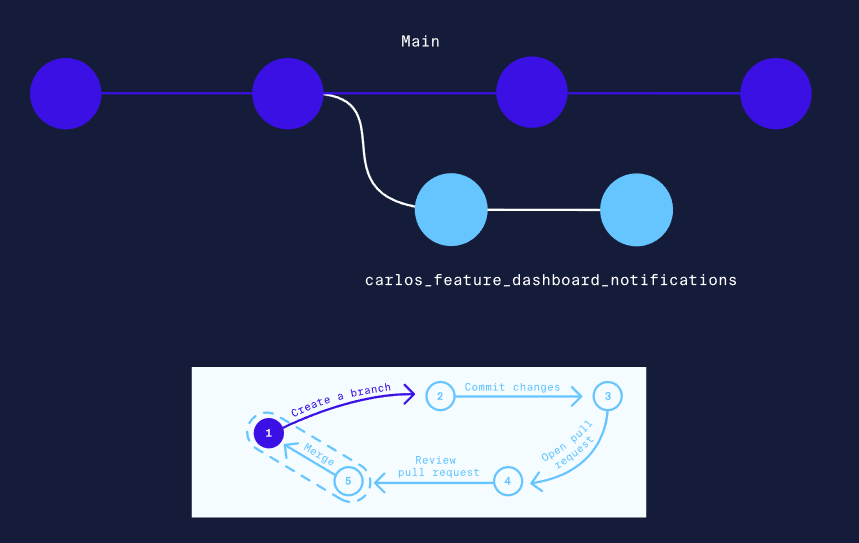
Managing Branches
Isolate other people’s codes (works) to avoid conflict. Git ables teammates to create their own branches off of the main project (bug-fixes, new features, experimental code, ect)
- Branch = divergence from the main project
- Branching out make a new state of current code, which you can work without affecting the important main state the code
- Can create as many branches and create branches off of other branches
- Using separate branches keep the main project intact and unaffected before the changes are reviewed and merged
- Main branch = the one where all changes eventually get merged back into (main) → usually the working version of a project and contains the production code MERGE CLEAN AND CORRECT CODE !
- A new branch should be created when adding new feature , bug fixes or experiments with a relevant name

Creating a Pull Request
Pull requests = allow collaborators to review and give feedback on proposed code changes before they are merged to the main branch
- Include as much relevant detail in description to save review time

- Don't only comment on what should be changed, but why it should be changed.
- Be as clear as possible with comments and make sure to be clear as to what to modify
- Try to spot potential errors

'Building Blocks' 카테고리의 다른 글
| Using .gitignore (0) | 2023.03.09 |
|---|---|
| Linux - Simple Commands and Navigation Part 1 (0) | 2023.02.17 |
| Directories in Linux (0) | 2023.02.16 |
| What is Git? (0) | 2023.02.16 |
| Basic Scripting (0) | 2023.02.15 |


