
| 일 | 월 | 화 | 수 | 목 | 금 | 토 |
|---|---|---|---|---|---|---|
| 1 | 2 | 3 | 4 | |||
| 5 | 6 | 7 | 8 | 9 | 10 | 11 |
| 12 | 13 | 14 | 15 | 16 | 17 | 18 |
| 19 | 20 | 21 | 22 | 23 | 24 | 25 |
| 26 | 27 | 28 | 29 | 30 |
- SCV
- strings
- crawler
- Classes
- Jupyter Notebook
- Filecoin
- python
- noob
- project
- directories
- JSON
- MyAnimeList
- .gitignore
- cached
- Django
- ansible
- GIT
- basics
- workbench
- pandas
- API
- MySQL
- DATABASE
- github
- Linux
- Methods
- commands
- Blockchain
- Anime
- forks
- Today
- Total
제니 블로그
Using .gitignore 본문
Github is a web-based hosting service for version control using Git. When collaberating with other development, it is commonly used. These can be made public, but when it is shown in public, there are some kind of data that should be hidden by other collaberators.
This is when .gitignore is used. We want to hide information like database configuration (ID, password) and the json file that we are currently using to get access to the API.
To do this, we first uploaded the whole myanimelist folder to github, making it the master branch.
Then we add the .gitignore file. We did ithis in git bash, which is a CLI for windows that allow usert to interact with Git version control system using bash shell language.
We initialize the myanimelist folder as a new repository in git.
$ cd project/myanimelist
$ git intit
We then add the .gitignore file.
$ git add .gitignoreThen we access the the command-line text editor using vi.
$ vi .gitignore

We want to hide the token.json and MYANIMELIST.md file which contains some of the private information we want to hide from the public repository. In the editor, we add the names of the files.

Since we uploaded the files before using the .gitignore, we need to remove the cache data of those files. To do this, we run this command in git bash from the myanimelist folder.
$ git rm --cached <file/folder>

$ git rm --cached token.json
$ git rm --cached MYANIMELIST.md
After, we commit the change.
$ git commit -m "Remove <file/folder> from Git cache"
$ git push origin main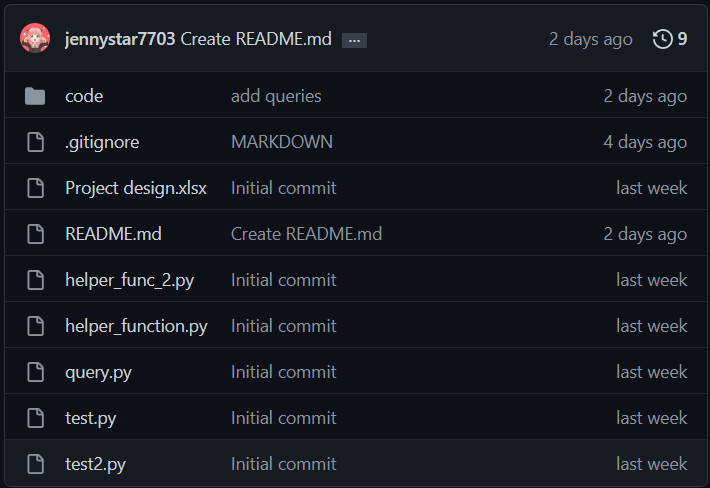
Now we see the .gitignore file, and don't see both the md file and the token file.

'Building Blocks' 카테고리의 다른 글
| Installing Ansible (0) | 2025.05.12 |
|---|---|
| Solving Leetcode : Longest common prefix (0) | 2023.03.15 |
| Linux - Simple Commands and Navigation Part 1 (0) | 2023.02.17 |
| Basics of Github - Concepts (0) | 2023.02.16 |
| Directories in Linux (0) | 2023.02.16 |

