
| 일 | 월 | 화 | 수 | 목 | 금 | 토 |
|---|---|---|---|---|---|---|
| 1 | 2 | 3 | 4 | |||
| 5 | 6 | 7 | 8 | 9 | 10 | 11 |
| 12 | 13 | 14 | 15 | 16 | 17 | 18 |
| 19 | 20 | 21 | 22 | 23 | 24 | 25 |
| 26 | 27 | 28 | 29 | 30 |
- forks
- SCV
- crawler
- ansible
- Django
- JSON
- basics
- Jupyter Notebook
- DATABASE
- workbench
- Methods
- MyAnimeList
- Linux
- github
- commands
- API
- Anime
- noob
- cached
- directories
- strings
- MySQL
- .gitignore
- Classes
- Blockchain
- project
- python
- pandas
- Filecoin
- GIT
- Today
- Total
제니 블로그
Setting up SSH Configurations 본문
SSH is used to connect to remote servers. It's the fundamental of basic Linux operations. It's convenient, but sometimes people make a big mistake of thinking that using a password is safe enough. Big Nono! Before the server goes into some kind of production mode, or even in development servers, SSH security is something that should be set up immedietely.
The default port for SSH is 22, and if you allow SSH connection, people can connect from anywhere, including the ones that have malicious intent.
View the config file and change it ASAP!
sudo vim /etc/ssh/sshd_config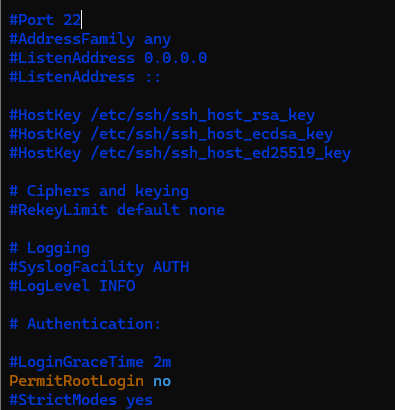
Usually a freshly set up server sshd_config file looks like this.
I've already changed the PermitRootLogin into no, because imagine what someone can do if they know the root password!
The default port in the config as mentioned, is 22 and it is HIGHLY recommended to change the port to something other than 22 (I mean it decreases the chance of your server getting jinxed)

I've changed to port 1031, it can be anything; as long as it the port does not overlap with anything else.

I've changed the X11Forwarding to no, because if you do not need any access to the GUI; you don't need it.
Also the AllowTcpForwarding part; this prevents users to access the server with port forwarding. It can prevent users from accessing private webservers and databases through SSH tunneling, as long as you make sure UFW or IPtables is secure enough.
After changing it, restart the service.
# sudo systemctl restart ssh

sudo systemctl restart sshd
When you logout, you must use the -p 1031 or the port number that you designated.
ssh -p 1031 user@212.212.121.121Also! If you are using a firewall MUST Allow that port, otherwise you'll get locked out.
For example :
# Enable ufw Firewall
sudo ufw enable
# Deny incoming!!!!
sudo ufw default deny incoming
sudo ufw default allow outgoing

# Allow the port you are using for ssh access
sudo ufw allow 1031/tcp
sudo ufw reload
Also if you want to acces the remote server from a certain IP;
sudo ufw allow from <ALLOWED IP ADDRESS> to any port 1031 proto tcp
sudo ufw deny 1031/tcp
You should also be setting up 2FA, but that's for some other time :)
'Building Blocks' 카테고리의 다른 글
| Creating a Partition + Using LVM (0) | 2025.05.26 |
|---|---|
| Using Ansible (0) | 2025.05.12 |
| Installing Ansible (0) | 2025.05.12 |
| Solving Leetcode : Longest common prefix (0) | 2023.03.15 |
| Using .gitignore (0) | 2023.03.09 |

