
| 일 | 월 | 화 | 수 | 목 | 금 | 토 |
|---|---|---|---|---|---|---|
| 1 | 2 | 3 | 4 | |||
| 5 | 6 | 7 | 8 | 9 | 10 | 11 |
| 12 | 13 | 14 | 15 | 16 | 17 | 18 |
| 19 | 20 | 21 | 22 | 23 | 24 | 25 |
| 26 | 27 | 28 | 29 | 30 |
- python
- Filecoin
- .gitignore
- commands
- noob
- MySQL
- MyAnimeList
- Django
- directories
- crawler
- Jupyter Notebook
- pandas
- Anime
- project
- DATABASE
- forks
- cached
- github
- Classes
- basics
- Linux
- Blockchain
- Methods
- JSON
- SCV
- strings
- API
- workbench
- ansible
- GIT
- Today
- Total
제니 블로그
Making a Database Schema 본문
Database
One of or if not the most important tool to store data!
For this project, we will be using mysql, which is already set up as, with the root and two users, Jenny and Liam!
The general idea is to have a database schema like this in a relational database.
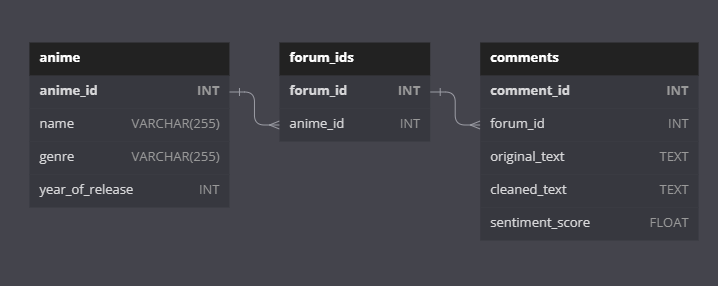
For this, we will be using mysql, with the python library mysql.connector, and the workbench that is installed on our local computers.
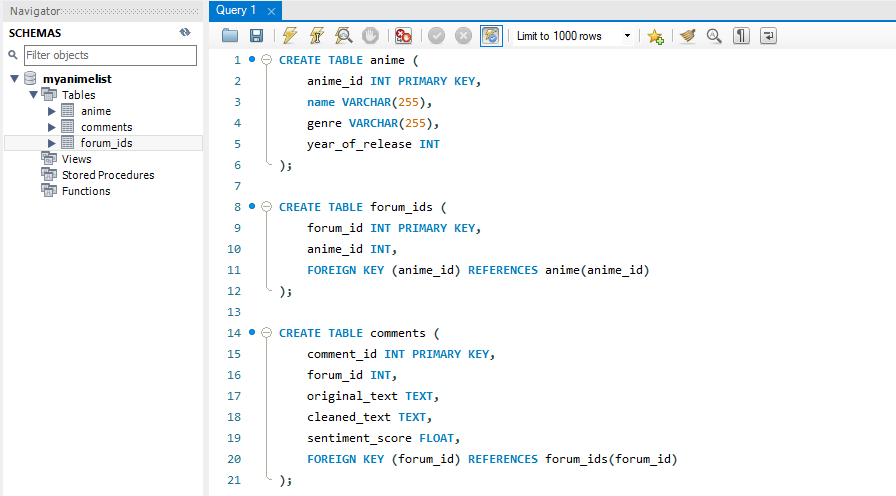
This query creates a table called anime, forum_ids and comments in a database schema called myanimelist.
We will be using the following libraries for these quereies :
import mysql.connector  # to connect to mysql server
import requests
import json
To connect to the following database, use
host = 'localhost'
database = 'myanimelist'
user = 'jenny'
password = ''

cnx = mysql.connector.connect(user=user, password=password, host=host, database=database)
cursor = cnx.cursor
This will connect to the database and it will allow making queries
# Perform a query
query = "SELECT * FROM anime;"
cursor = cnx.cursor()
cursor.execute(query)

# Fetch and print the results
for result in cursor:
    print(result)

# Close the cursor and connection
cursor.close()
cnx.close()
Checked it connected successfully!
Next step is the headache part, which is calling the right API data and inserting that correct data into the database for each table.

'Project' 카테고리의 다른 글
| Starting a Django project (0) | 2023.03.20 |
|---|---|
| Inserting Data into the database (0) | 2023.03.07 |
| Text Preprocessing (0) | 2023.02.25 |
| Getting the Data from API (0) | 2023.02.21 |
| Getting the Forum ID for episode discussions (0) | 2023.02.19 |


